
1
/
of
1
4Boats
Remote MT50 Meter for MPPT & PWM Solar Controllers | 4Boats
Remote MT50 Meter for MPPT & PWM Solar Controllers | 4Boats
Regular price
£34.99 GBP
Regular price
Sale price
£34.99 GBP
Taxes included.
Shipping calculated at checkout.
Quantity
Couldn't load pickup availability
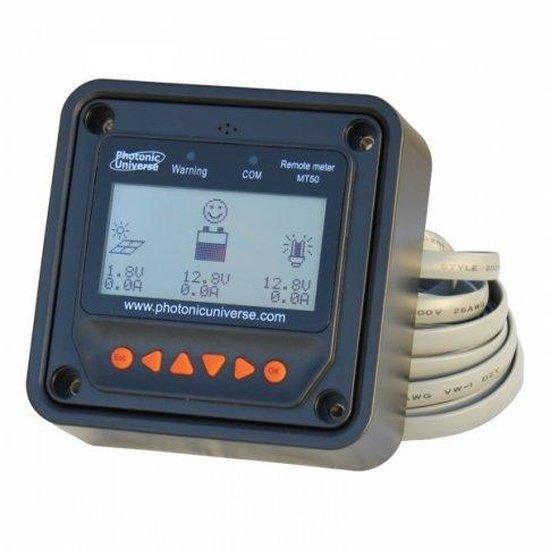
Compact Remote MT50 display for remote monitoring and advanced configuration of compatible MPPT and PWM solar charge controllers.
- Adjustable parameters: amend the battery type and capacity.
- Select charging voltages for different charging stages.
- Specify the duration of each charging stage.
- Create a user-defined battery profile.
- Personalise load settings. Timers for lighting, fans and pumps can be configured.
- The display shows PV and battery voltage, charge current, state of charge (SOC) and error codes.
- Self-diagnostic capability. The unit highlights system errors using advanced fault-targeting technology.
- Removable external frame for flush or surface mounting. Wall mounting frame with mounting holes included.
- Compatibility: Suitable for our high-efficiency MPPT and PWM solar charge controllers, including TR and PTR series (models TRxxxxBN, TRxxxxAN and PTRxxxxAN), VS series (models VSxxxxBN), PU series (models PUxxxxB) and PU waterproof (models PUxxxxBW). A compatibility cable is required.
- Connection: RJ45 (8-pin) communication cable — 5 metres included. Controllers with an RS485 port require an RS485→RJ45 adapter for connection.
- Please note: This remote meter is not suitable for dual battery solar charge controllers.
- Specifications: Suitable for MPPT and PWM solar charge controllers TR/PTR/VS/PU/LS Series. Self-consumption 15–65 mA (depending on backlight settings).
- Environmental & dimensions: Operating temperature -20°C to +70°C (-4°F to 158°F). Size without frame 10 x 10 x 3 cm (3.9 x 3.9 x 1.2 in). Size with frame 12 x 12 x 5 cm (4.7 x 4.7 x 2.0 in). Weight 230 g (0.51 lb).
- Installation: The unit comes with a detailed user manual which explains connection and operation.
For best results plug the supplied RJ45 cable into a controller RJ45 socket. Use an RS485→RJ45 adapter where required. See the manual for full compatibility and installation information.
Share
No reviews